User manual

How to use arandu on WhatsApp

This guide shows how to register a field, read the satellite reports, send crop photos, check weather, and change your settings.

First setup

Register a new field in a few WhatsApp messages

arandu guides you step by step. You only need to send a location from inside the field, confirm the detected boundary, and choose your crop.

1

Send your location

Send a WhatsApp location or Google Maps pin from inside the field.

Ready to register a new field!

📍 Send your location INSIDE the new field:
📎 → Location → Send location
🗺️ You can also send a Google Maps link or dropped pin from inside your field.
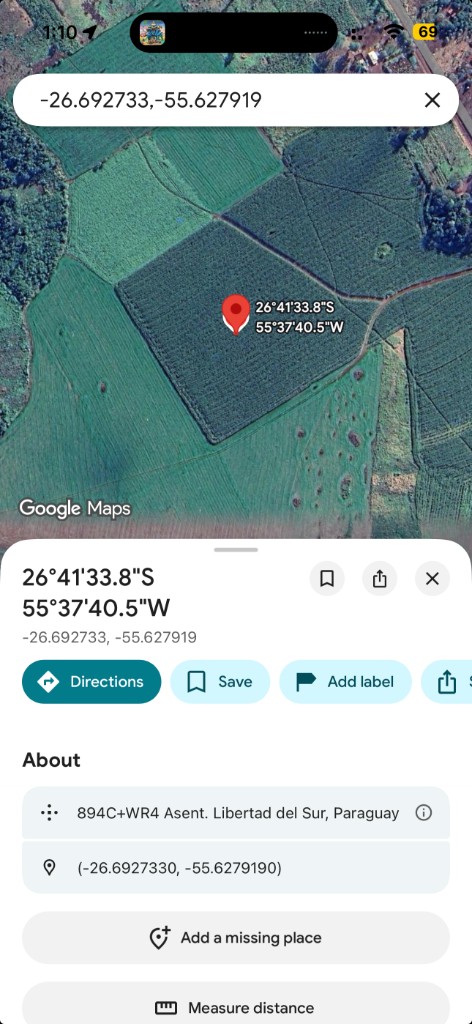
Google Maps pin showing coordinates inside a field
A Google Maps link or dropped pin works as long as the point is inside the field you want to register.
🛰️ Searching for your field in satellite images...
2

Confirm the field boundary

When the satellite detection finishes, confirm the field or ask to adjust it.

🛰️ Field detected!

📐 Area: ~23.6 hectares
🗺️ View on map: https://maps.google.com/?q=-20.910947,-48.818051

Is this field correct?

1️⃣ ✅ Yes, confirm
2️⃣ ❌ No, adjust
2
📝 Field Editor

Draw or adjust your field boundary:

🗺️ https://field-intel-whatsapp.../edit/...
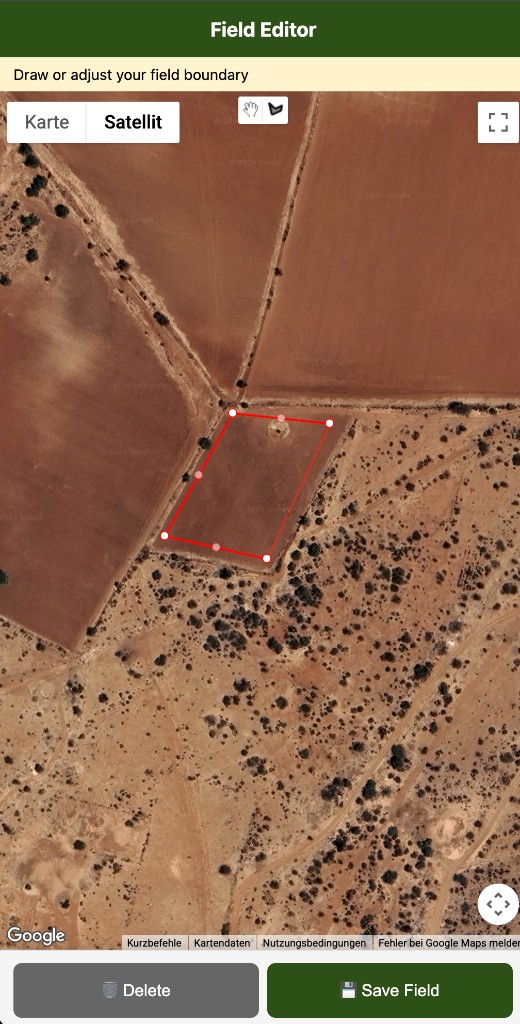
Field editor showing an adjustable polygon on satellite imagery
If the field is not detected correctly, choose No, adjust. The editor link lets you move the polygon points, delete the draft, or save the corrected field.
3

Name the field and choose the crop

Give the field a simple name and select the crop from the numbered list.

✅ Field saved!

🏷️ Type a name for this field (e.g., North Lot)
corn-field-1
✅ Field name saved.

🌾 What crop do you have in this field?

1️⃣ 🌿 Soybean
2️⃣ 🌽 Corn
3️⃣ 🌾 Wheat
4️⃣ 🌱 Pasture
5️⃣ 🍚 Rice
6️⃣ 🥜 Peanut
7️⃣ 🌻 Sunflower
8️⃣ 🎋 Sugar cane
9️⃣ ❓ Other
2
4

Confirm the planting date

arandu estimates the season start from satellite data. You can accept it or enter the real date.

🌾 Crop registered: Corn

🛰️ Based on satellite data, I estimate your Corn season/planting start was 01/01/2026.

Do you want to use this date?
1️⃣ ✅ Yes, use this date
2️⃣ ✏️ No, I'll enter the real planting date
1

Main menu

What each menu option does

After setup, reply with the menu number. arandu sends a short answer first and a heatmap image when available.

1Crop Health: vegetation vigor and stress.
2Nitrogen Status: chlorophyll and nutrient signals.
3Water Status: plant moisture and dry spots.
4Flood Detection: standing water or saturated areas.
5Erosion Risk: soil loss risk and bare soil exposure.
6Analyze Photo: send a crop photo for visual support.
7Explanations: learn what the reports mean.
8Weather Forecast: upcoming rain and field-work hints.
9Yield Outlook: seasonal production outlook when available.
10Change Settings: field, crop, language, and data options.

Sample reports

Report types and example heatmaps

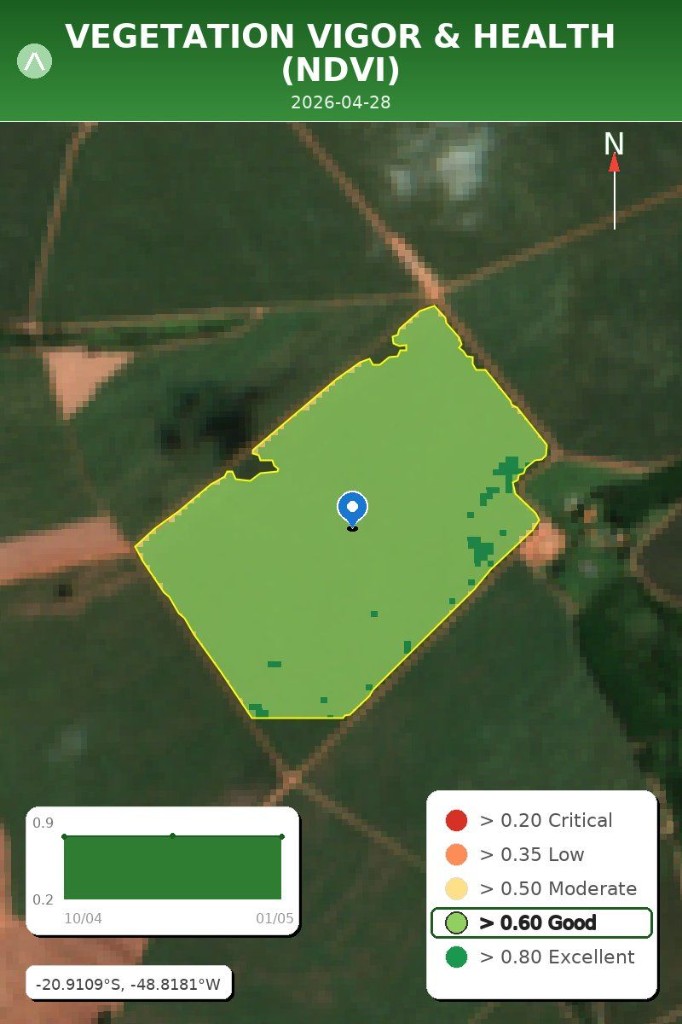
Each report combines a short WhatsApp explanation with a field image. Use the color legend to read the map, and the trend chart below it to see recent movement. The image date tells you how recent the satellite or radar data is.

How to read a report message

Most satellite reports follow the same structure so you can scan them quickly in WhatsApp.

  • Headline: the colored status icon and short title tell you the urgency first.
  • Current State: what the latest image shows now, including crop condition and growth stage when available.
  • 30-day trend: whether the field is improving, stable, or declining over the last 4 weeks.
  • 5-year median comparison: how today compares with normal seasons for the same time of year.
  • Date: the satellite or radar image date, so you know how fresh the observation is.
🟢 Excellent Vigor

📸 Current State
Your sugarcane field is showing excellent health and high vigor according to the satellite image from April 28, 2026. The crop is in the harvest stage and looks very strong across the entire area.

📈 Trend (4 weeks)
The field's vegetation levels have remained very stable over the last few weeks. The growth trajectory is strong and holding steady as you approach harvest.

📊 Historical Comparison (5 years)
Your sugarcane is performing significantly better than the 5-year average for this time of year, running at 118% of the historical level.

🕒 Date: 28/04/2026
Sample NDVI crop health heatmap
NDVI crop health heatmap, 28/04/2026.

Crop Health

Shows vegetation vigor across the field. In the sample, the corn is very healthy, stable over four weeks, and about 6% above the historical average.

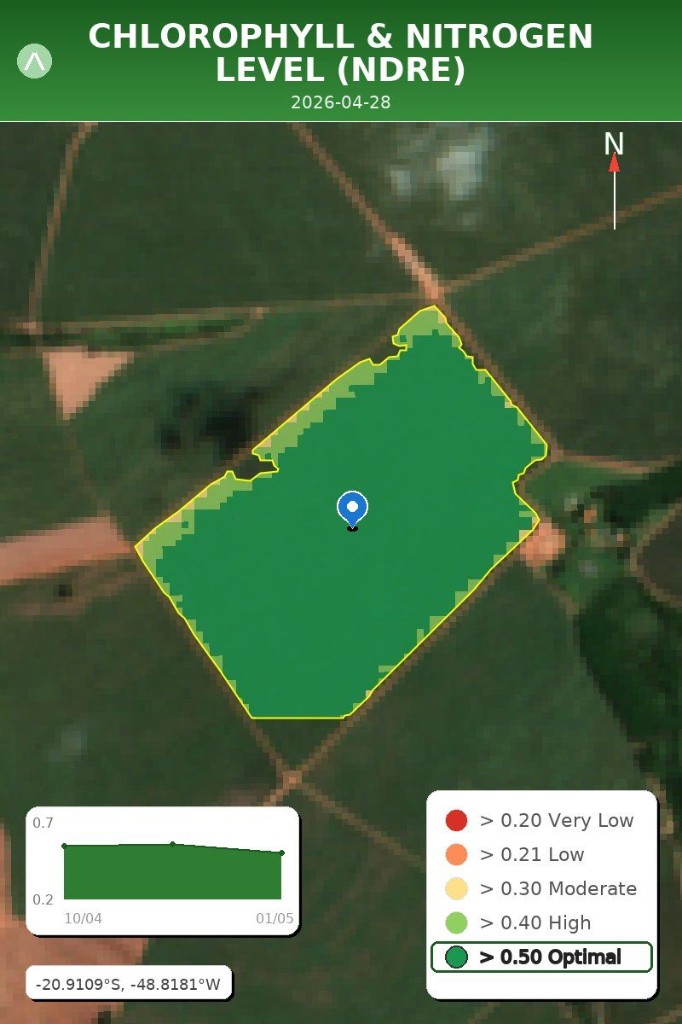
Sample NDRE nitrogen heatmap
NDRE chlorophyll and nitrogen heatmap, 28/04/2026.

Nitrogen Status

Highlights chlorophyll and nutrient signals. The sample shows optimal levels across the field, with no immediate action needed.
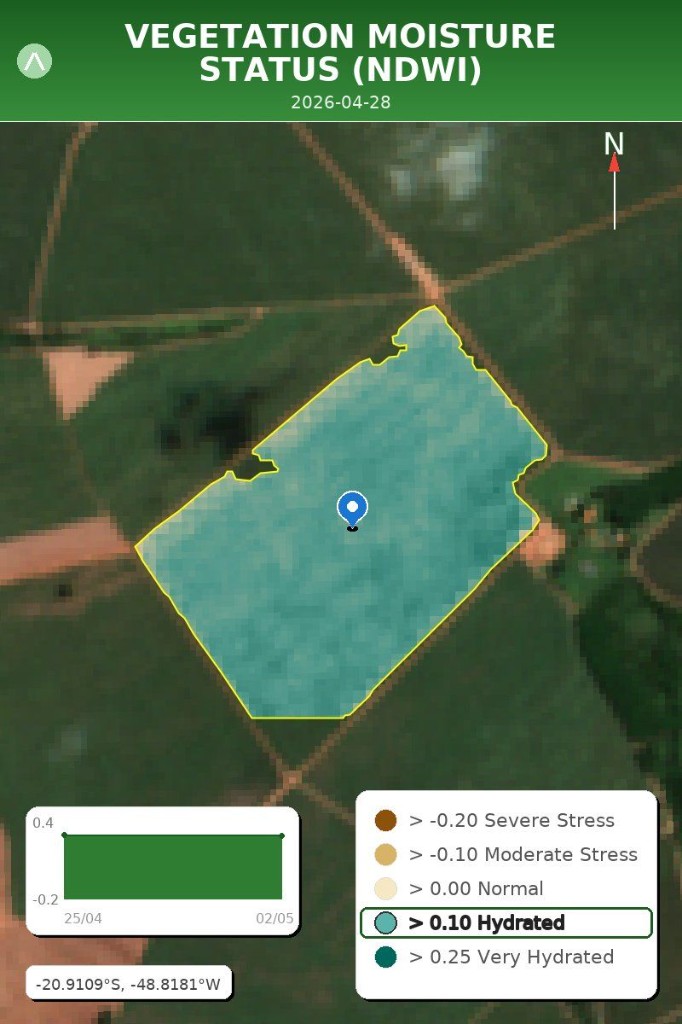
Sample NDWI moisture heatmap
NDWI vegetation moisture heatmap, 28/04/2026.

Water Status

Checks whether plants are holding moisture. In the sample, the field is well-hydrated and about 12% above the normal moisture level for the date.

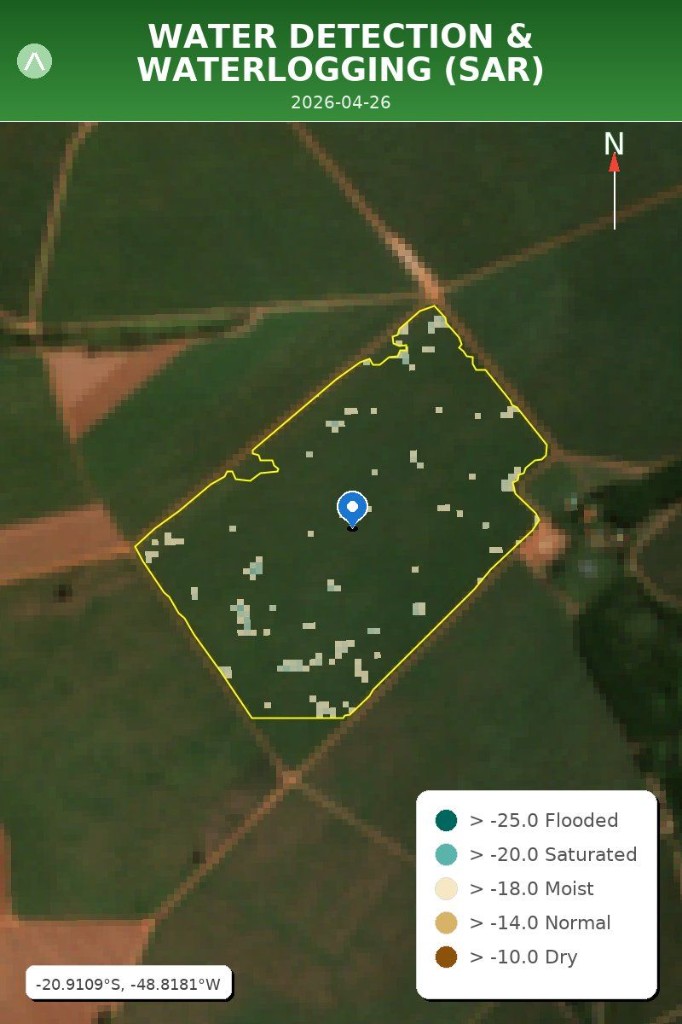
Sample SAR flood detection heatmap
SAR flood detection heatmap, 26/04/2026.

Flood Detection

Uses radar imagery to detect standing water even when clouds are present. The sample shows no significant flooding, only about 0.02 hectares of possible standing water.
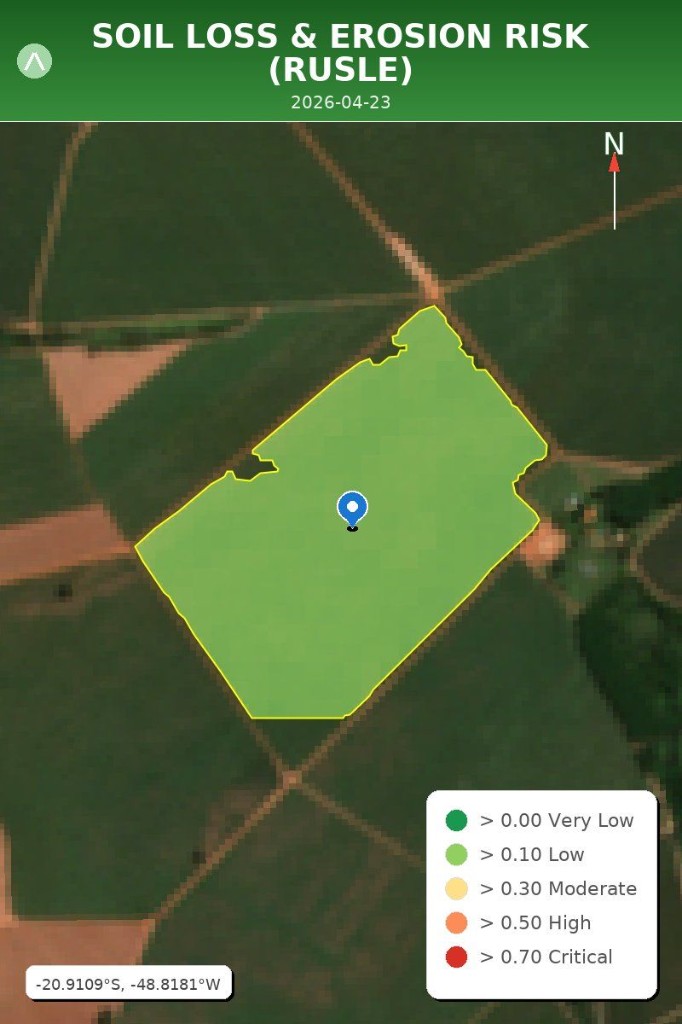
Sample RUSLE erosion risk heatmap
RUSLE erosion risk heatmap, 23/04/2026.

Erosion Risk

Estimates soil loss risk from slope, rain, cover, and bare soil exposure. The sample shows low erosion risk with protected soil cover.

Extra tools

Photos, weather, and settings

These tools follow the same habit as the satellite menu: pick a number, follow the next prompt, then read the structured answer. Each block below walks through the steps with sample chat bubbles.

Photo analysis

Turn a photo in the furrow into observation, possible causes, scouting ideas, and a quick severity cue.

1

Open photo analysis

When you see the analysis menu, send 6. arandu switches to photo mode and explains how to attach your picture.

6
📷 Send a photo of your crop and a question.

Example: Send photo + “What's wrong with this plant?”
2

Send the image plus one concrete question

Use good light, hold the phone steady, and add text such as What is wrong with these leaves? Close-ups beat distant silhouettes when you need symptom detail.
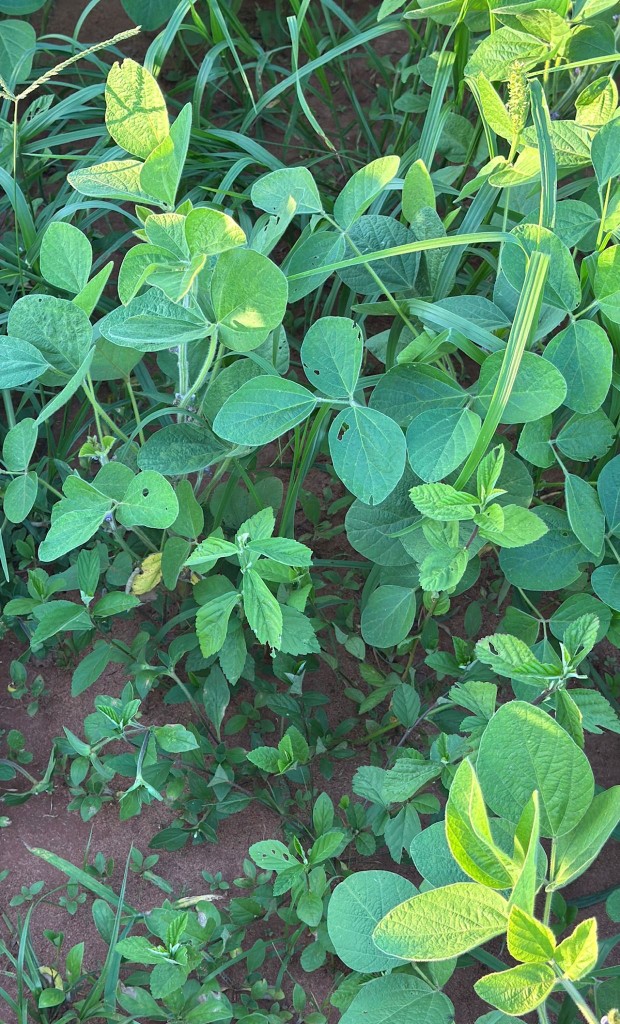
Soybean crop photo with weeds and minor leaf feeding damage
Example crop photo: soybean with weed pressure and small feeding holes.
3

Read the four-part reply

The message summarizes Observation, Possible diagnosis, Recommended actions, and Severity so you can match it with boots-on-the-ground scouting.

  • Observation: arandu identifies the crop, visible weeds, leaf damage, yellowing, necrosis, or disease symptoms.
  • Possible diagnosis: the sample soybean looks generally healthy, with weed competition and minor insect feeding.
  • Recommended actions: scout weeds and insects, check defoliation thresholds, and keep watching for diseases such as rust or leaf spot.
  • Severity: arandu summarizes urgency, for example Low when crop health is good and the main risk is weed management.

Weather forecast

One message bundles outlook, rain totals, and farm-planning hints.

1

Request the five-day outlook

Send 8 from the analysis menu. arandu answers with a title line, a short conditions summary, and supporting detail when the weather service returns data.

8

🌤️ Weather Forecast (5 days)

Dry conditions: 0mm total rain expected over the next 5 days.

  • Daily outlook: min/max temperatures and sun, cloud, or rain icons for each day.
  • Spray windows: highlights acceptable periods and warns when wind is too high for application.
  • Irrigation: tells you when to irrigate now if a dry period is expected.
  • Farm planning: use the forecast to plan spraying, irrigation, scouting, and field access.
2

Plan spraying, irrigation, and field access

Scan for spray-safe windows, irrigation timing, wind and temperature alerts, then combine that with what you can see from the field gate.

What to scan first

Start with the headline outlook and total rain, then read spray and irrigation sections before loading equipment.

Settings

Settings stay behind option ten so the first nine lines stay focused on agronomy.

1

Open the settings drawer

Send 10 (Change Settings). The analysis list always ends with that option so you can reach field, crop, language, and privacy tools in one place.

10
👋 Welcome back!

📍 Your saved field: North Lot
📐 23.6 hectares
🌾 Crops: Corn

What would you like to do? Reply with the menu number:

1️⃣ ✅ Use same field & crops
2️⃣ 🌾 Change crops only
3️⃣ 📍 Register new field
4️⃣ 🔀 Switch field
5️⃣ 🗑️ Remove field
6️⃣ 🌐 Change language
7️⃣ 🗑️ Delete all my data
2

Pick the numbered row that matches your task

You will see your active field recap plus numbered choices. Each row does one job—use the guide below if you are unsure which number to send.

1Use same field & crops: opens the satellite analysis menu (1–9) for your current field. arandu may ask you to confirm the planting season if it looks outdated.
2Change crops only: updates crop types on the active field. Reply with crop numbers from the list, for example 1 for soybean or 1, 2 for soybean and corn.
3Register new field: runs the same location-and-boundary setup as your first field. You can save up to 10 fields per WhatsApp number.
4Switch field: lists saved fields by number. Reply with the field you want active for the next report. Send 0 to go back without switching.
5Remove field: delete one or more saved boundaries. Reply with field numbers separated by spaces, for example 1 3, then confirm with 1 (yes) or 2 (no).
6Change language: pick from nine languages (Spanish, Guarani, Portuguese, English, German, French, Quechua, Hindi, Tamil), confirm, then continue.
7Delete all my data: permanently removes fields, chat history, logs, and stored images. Shown only when enabled for your line. Two-step confirm: Continue, then type the exact keyword arandu shows (for example DELETE). Type menu to cancel.
3

Shortcuts from the analysis menu

You do not always need option 10. From the satellite menu you can also type:

  • menu — show the analysis menu again (options 1–10).
  • fields — jump straight to switching or removing a saved field.
  • help — tips for location sharing, crops, and menu use.
4

Change crops on the active field

Send 2 from the settings menu. arandu shows the crop list; reply with numbers only. Thresholds and growth-stage hints in later reports follow the crops you pick.

2
🌾 *Which crop is in this field?*

Reply with the number (or numbers separated by commas):

1️⃣ Soybean
2️⃣ Corn
3️⃣ Wheat
1, 2
✅ Crops updated. Type menu when you are ready for an analysis.
5

Switch or remove saved fields

Send 4 to switch the active field, or 5 to remove one. arandu lists each saved field with area and crops. After a switch, request a report from the main menu; after removal you may need to pick which field stays active.

4
📍 *Select a field*

1️⃣ North Lot — 23.6 ha — Corn
2️⃣ South Pasture — 8.1 ha — Pasture
0️⃣ ↩️ Back to menu

Reply with the number:
2
✅ Active field updated.
6

Delete all account data

Option 7 is irreversible. arandu warns you, asks you to continue or cancel, then requires the exact confirmation word in your language before erasure starts in the background.

7
⚠️ *Delete all my data*

This will permanently remove your account data (fields, chat history, logs, and stored images).

1️⃣ Continue
2️⃣ Cancel
1
To confirm, type exactly: *DELETE*

Type *menu* to cancel.
  • Register up to 10 saved fields per WhatsApp account. At the limit, remove a field before adding another.
  • Switch fields before crop health or water reports so thresholds match the right parcel.
  • Removing a field deletes only that boundary—not your whole account. Use option 7 for full erasure.
  • More on privacy and deletion: see Terms & privacy → How to delete your data.